
For a first app with saved data and sign-in, consider Lovable Cloud if you want to manage the backend inside Lovable. Choose your own Supabase project when an existing project or a specific need for account-level control makes the extra setup worthwhile. A simple website may not need either yet.
Lovable Cloud uses Supabase's open-source foundation. The useful comparison is where you manage the services, which tools you get, and who bills you. Lovable describes Cloud as its built-in backend.
Documentation checked November 6–7, 2026. This is a comparison based on official sources, with an original conceptual example. We did not connect accounts, run a migration, or benchmark either option.
Does your app need a backend yet?
A page showing your book recommendations and an email link can work without reader accounts or a database. Start there if that is the whole idea. Our Lovable beginner guide explains the first-build workflow.
The decision changes when visitors create information that the app must remember. A visitor choosing a display colour is different from a reader expecting a private book list to survive a lost phone. Saving something in one browser can be enough for a small personal experiment. It does not by itself give the same person an account and synchronized records on another device. Describe that expected behavior before choosing a service.
Now imagine a reading-list app where each reader saves books, marks them finished, and sees the same list on another device. Optional cover uploads add one more requirement. This fictional app helps separate the pieces:
| Part | What it does in the example |
|---|---|
| Frontend | Shows the book list, buttons, and forms in the browser |
| Database | Saves book records, reading status, and which reader each record belongs to |
| Authentication | Establishes which reader has signed in |
| File storage | Keeps uploaded cover images |
| Hosting | Makes the running app available to visitors |
These pieces have different jobs. Signing in identifies a reader; access rules must also prevent that reader from opening someone else's private list. Adding a login screen alone does not establish privacy.
Follow one action through the example. A reader types a book title and presses Save. The frontend sends a request; the backend checks whether that reader may create the record and stores it with an owner. When the reader signs in on another device, the app requests that reader's saved records. A book appearing immediately on the first screen proves only that the screen changed. The useful acceptance check is whether the correct saved record returns later for the correct person.
Some features also need server-side logic: work performed outside the visitor's browser, such as calling a book-information service with a secret API key. This is another backend responsibility. It helps to name the behavior—“look up this book”—before deciding whether it needs a function, a database query, or only a change to the page.
Two backend arrangements for the same app
With Lovable Cloud, backend services are managed through Lovable. With your own Supabase project, you connect a project from a Supabase account you control. Supabase confirms that a Cloud-managed project does not appear in your personal Supabase dashboard. See its backend identification guide.
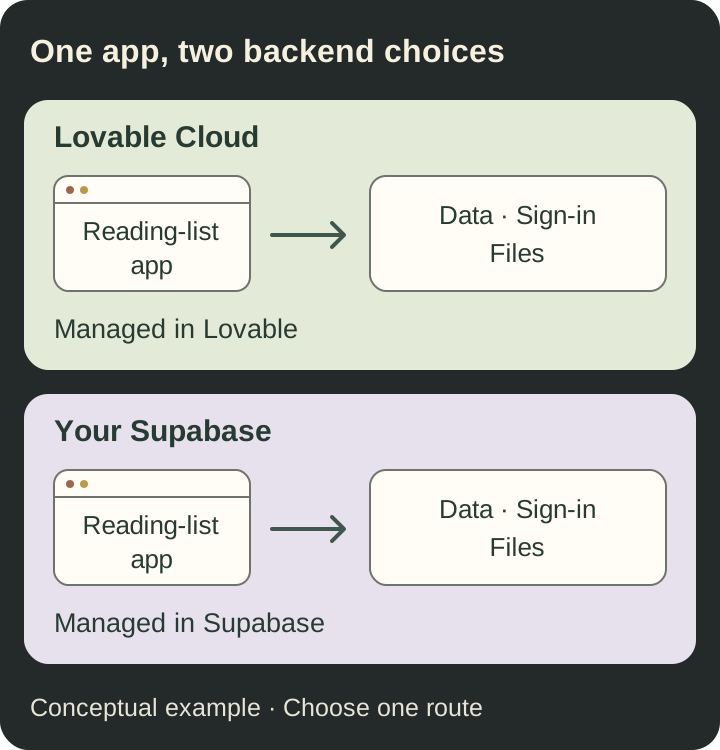
Conceptual diagram. Each route represents a separate choice for the example app, not a tested connection or a migration path.
Supabase provides a full PostgreSQL database. Connecting an external project does not mean installing a database server on your laptop. Here we are comparing the hosted Supabase service with Lovable's built-in backend, not a self-hosted server.
What working with Cloud looks like. You describe a feature in Lovable, then review the generated app and its backend behavior. Cloud provides database, user, file, and function tools within the same product. For the reading list, the question is whether the book is saved, connected to the right reader, and retrieved correctly. You still need to understand those relationships even when the platform creates the underlying pieces for you.
What working with your own Supabase project looks like. You continue building the app in Lovable, while inspecting and administering the backend in Supabase. The integration can generate database changes and functions against that connected project. Choosing external Supabase therefore does not mean writing the whole backend by hand. It means taking responsibility for the separate project and knowing where to examine a change. The integration guide describes what Lovable can do through that connection.
This matters when something goes wrong. If a book disappears after refreshing, the visible page, the stored record, and the reader's access rules are separate things to investigate. With Cloud, you begin with the backend tools inside Lovable. With your own project, you also need to find the relevant data and settings in Supabase. Pick the arrangement you or your maintainer can actually inspect, not merely the one whose signup looks shortest.
What changes for you as the owner?
Use this table to identify the responsibilities you want to take on. The Lovable integration documentation explains the two arrangements and their feature limits.
| Decision | Lovable Cloud | Your own Supabase project |
|---|---|---|
| Account setup | Backend within your Lovable workspace | Separate Supabase account and project connection |
| Daily management | Backend views inside Lovable | Supabase dashboard |
| Backend bill | Lovable credits | Supabase plan and usage |
| Sign-in configuration | Managed through Lovable | Configured in Supabase |
| Infrastructure controls | Lovable's available management tools | Supabase's available project controls |
The tools are not identical. For example, Lovable's automated browser testing while signed in is documented for its built-in backend. With external Supabase, its browser testing covers pages that do not require sign-in. That limitation concerns Lovable's testing tool; it does not prevent you from testing your own app manually. Check the current feature list for anything your project depends on.
Cloud also has database backups and export and capacity controls. Do not choose Supabase merely because you assume Cloud offers no way to inspect or manage a database. Instead, name the particular control you need and verify it for the relevant plan.
Managed infrastructure still leaves decisions with you. Supabase's shared responsibility model explains the customer's role in database access, configuration, and operation. For the reading-list example, plan a check with two separate readers: one reader must not be able to read or change the other's private records. That is a proposed acceptance check, not a test performed for this article.
Turn “private” into a precise rule. Suppose Mina and Arun each save a book. Mina should be able to read, edit, and delete her own entry, while Arun should have the same rights over his. A public recommendation page would require a different rule. Decide whether sharing means a public copy, an invitation, or access for everyone in a reading club. The backend cannot infer the right product policy from the word “private.”
Supabase's Row Level Security documentation explains how policies enforce access to individual database records. Hiding Arun's book with a frontend filter is insufficient: the permission must also hold when a request reaches the data service. Review which operations are allowed, not just whether the initial screen looks correct.
Keys need the same distinction. A browser-facing publishable key is different from a privileged secret key. Supabase's API-key guide explains that secret keys, including legacy service_role keys, bypass row-level restrictions and belong in trusted server code. A request to “make the permission error go away” must not result in putting a privileged key in the browser. Both backend choices still need correct application access rules.
Plan recovery before you need it. Imagine a change accidentally deletes everyone's reading status. Ask what can be restored, how much recent work could be lost, and who can make that decision. A database backup, uploaded cover files, and a previous version of the app's code are different recovery materials. Lovable's backup documentation describes database restoration and its limits; it does not make every component of an app return to the same moment automatically.
For a first app, a useful ownership note can be short: who manages the service account, who receives usage alerts, where recovery instructions live, and who checks the result after a change. A more powerful dashboard adds value when someone can use it to answer those questions. Merely having access to more settings does not make the app easier to maintain.
Keep build costs and running costs visible
Lovable's credit documentation describes one balance covering building, Cloud, and in-app AI usage. A credit is a unit of usage; it does not represent one completed app. Check what your included allowances cover and what happens when they run out.
With external Supabase, backend usage follows Supabase's billing. Paid Supabase organizations have a subscription plus applicable compute, usage, and add-on charges. Choosing that backend does not remove the cost of building in Lovable or hosting the frontend.
For your own estimate, write down the number of readers, saved records, uploaded files, and expected activity. Compare the resulting service requirements instead of two headline subscription prices. Use our Lovable credits guide and AI app cost guide for the wider budget.
Consider an illustrative pilot with 20 invited readers and 50 saved books each: 1,000 book records. This describes the proposed content, not a benchmark or a cost estimate. It tells you little about how often people reload lists, how large their cover images are, or whether every saved book triggers a paid AI request. Those choices can change the workload even when the reader count stays the same.
Prepare two versions of the estimate. The first covers a text-only reading list with sign-in. The second adds cover uploads and automatic AI summaries. For each version, identify the building tool, frontend hosting, backend, and any separately billed service. Record which charges are already bundled so you do not count the same service twice. Also allow for the person's time spent checking errors and making changes.
Then choose what you will observe during the pilot: active readers, file volume, costly feature use, and the provider's usage report. Decide who will respond to an unexpected increase and what optional feature can be reduced. A modest measured workload is a better basis for the next decision than assuming that “free” or “all included” will cover every future version of the app.
Choose for one of these three situations
These are editorial recommendations based on the requirements below. They are not performance rankings.
1. You are trying a small first app
You want a few invited readers to save a book and return to it later. You have no existing backend and no requirement for a separate infrastructure account.
Start by considering Cloud. Keeping the work in one product reduces the number of places you need to learn. Before inviting readers, check the data rules, usage allowance, and recovery options. The decision changes if you discover a specific feature or management requirement that Cloud does not meet.
A useful first version could have four actions: sign in, save a book, mark it finished, and delete your own entry. Leave cover uploads, social sharing, and automatic recommendations for later unless one of them is the reason people would use the app. This gives you a smaller set of behaviors to understand and check.
For this situation, the reason to choose Cloud is the simpler management workflow. The recommendation is not evidence that Cloud will be faster or cheaper for every app. Reconsider when you can name an unmet need—for example, a maintainer must work in the team's own Supabase account—not simply because the prototype is becoming more useful.
2. You already have a Supabase project
Your reading club already has a maintained Supabase project, someone responsible for it, and data the new app needs.
Evaluate connecting that project. First map which records the app may use and who can approve changes. An existing project is useful only if the new app fits its permissions and maintenance arrangements. Do not use real club data as disposable practice material.
Suppose the club already stores its book catalogue and member accounts in Supabase. Keeping those records together may avoid maintaining a second version of the catalogue. But a new reading-status feature must fit the existing structure. Establish whether the app will reuse member identities, add separate records, or change rules that another app already depends on.
Before approving that work, agree on a practice environment with synthetic records and on the existing behaviors that must keep working. “We already have Supabase” is a useful starting point, not permission to let a new app change everything in the project. If nobody understands or maintains that backend, investigate that gap before connecting another product to it.
3. You need to manage the backend independently
Your team wants its own Supabase organization, dashboard access, and a backend bill it manages directly. Someone is prepared to handle configuration and ongoing checks.
Consider your own Supabase project. Write down the required controls before connecting it. “We might become large” is not a concrete requirement; “our maintainer needs to administer this project in our Supabase account” is. Check which Lovable conveniences you would give up as part of the choice.
This can also matter when building for a client. The client may need to manage the backend bill and give its future maintainer access without depending on the original builder. Agree on account ownership, operational access, and who will handle incidents before creating the project. Those are concrete handover requirements rather than predictions about future traffic.
For this team, the extra dashboard is acceptable because someone already has a job to do there. If you are the only builder and cannot identify that job, separate infrastructure might add work without solving today's problem. Independence is useful when its benefits and responsibilities both have an owner.
What if you want to switch later?
Treat a backend move as planned work. Lovable's export documentation describes a database export containing structure, records, and user accounts, including password hashes. Storage files, function code, secrets, and sign-in settings require separate handling. Exporting code alone is not a complete move.
For the reading-list app, the destination would need the book records, working reader sign-in, cover files, and the same privacy behavior. A developer would also need to check the app's connections and external services. This article does not provide or claim to have tested that migration.
You may not need to move everything. Lovable documents hosting the frontend elsewhere while retaining its backend. Decide which part needs to change before planning a complete departure.
Prepare an inventory before asking someone to estimate the move:
- Data structure and records: which tables exist, how books relate to readers, and which identifiers must stay consistent.
- Accounts and access: how readers sign in, which rules protect their lists, and what must happen for existing users after the move.
- Files: where covers are stored and how the app finds them. A database record containing a file address is not the image itself.
- Backend behavior: functions, scheduled work, and calls to outside services that the visible app depends on.
- Configuration: service addresses, secrets, sign-in redirects, and who controls the destination accounts.
These are planning questions, not a migration sequence. For the reading list, an acceptance brief could require the destination to contain the expected book records, allow an existing reader to sign in, show the correct covers, and preserve private access. A successful import is only one part of that result. Someone must also decide how to handle books added while the move is taking place.
Keeping the scope small early makes this inventory easier to understand. Every extra integration adds something to configure and verify later, whichever backend you choose. Portability gives you options, but the work of exercising an option depends on what the app has accumulated.
A short worksheet for your decision
Before enabling or connecting a backend, complete these sentences:
- My app needs to save… Name the records and files, or say why no backend is needed yet.
- Each user may access… Describe what is private and what is shared.
- I need these management controls… List actual requirements, not future possibilities.
- The person checking usage and recovery will be… Assign responsibility, even if it is you.
- I would reconsider this choice if… Name a missing feature, account requirement, or observed cost that would justify the work of moving.
For the small reading-list pilot, the completed answers could be: save book titles and reading status; let each invited reader manage only their own entries; manage the backend from Lovable; have the builder check usage and recovery; reconsider if a future maintainer needs a separate Supabase account. Those requirements support trying Cloud, with cover uploads and AI summaries left outside the first version.
Change just one answer and the recommendation can change. If the club already has maintained member accounts and a catalogue in Supabase that this app must use, evaluating that project becomes more sensible. If all you need is a public page of five recommended books, remove sign-in and personal records from the requirements; the backend comparison may no longer be the next decision at all.
The worksheet should produce a short explanation you can return to: what you chose, why it fits the first version, what you will check, and what would justify changing it. That record is more useful than repeatedly choosing a platform from somebody else's list of advantages.
Turn those answers into a small build request using our Lovable prompt examples. Start with the behavior you can check, such as saving one book and seeing it again after signing in.
The RianVibe Vibe Coding course teaches a Todo app with a separate Supabase project, authentication, row-level access rules, and GitHub/Vercel deployment. That is the course's learning path. Choose your own app's backend from its requirements and the work you are ready to manage.